Find What You’re Looking for in Dynamics GP with Inspector!
Feb 16, 2023
Microsoft Dynamics GP is an incredible product, but there are a few things you’ve been asking for (or like 27) that would make it even more incredible. Dynamics GP Toolbox is one of our most popular add-ons. It’s packed with a ton of functionality designed to save you time, money, and frustration while improving your user experience. Let’s start finding what you’re looking for!
Welcome Dynamics GP Toolbox’s Inspector!
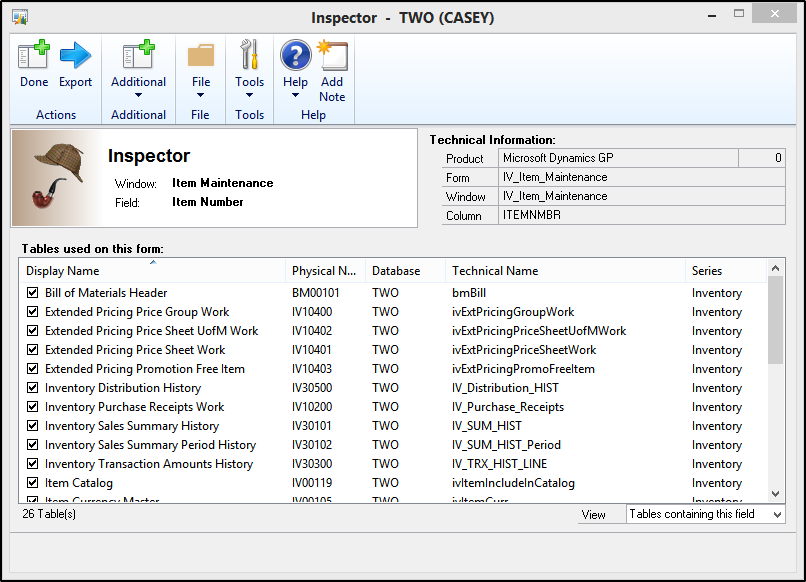
After you’ve installed our add-on product, and open Inspector (Dynamics GP Toolbox >> Inspector) every window becomes more interesting. Inspector will use its investigative prowess to display detailed technical information in virtually any window in Microsoft Dynamics GP or any dexterity-based product. It will show you tables that contain the actual field, product, form,window, and column. You’ll now be able to find what you’re looking for!
Uncover Info You Need with Inspector
If you’re wanting to find tech information behind windows, including 3rd party products, consider installing Dynamics GP Toolbox! Inspector (which is just one of 27 amazing tools) is great for Smartlists, Smartlist Builder, custom reporting, and data research on windows to determine where data is coming and going. Here’s a quick video on YouTube for you to see all that Inspector can do for you! (No deerstalker hat or tobacco pipe required!)
Buy Automating Vendor Rebates, Businesses Can:Automated systems ensure rebates are calculated accurately, eliminating the risk of human error. With a streamlined process, employees spend less time manually managing rebates and can focus on more strategic tasks. Timely...
Did you know that Microsoft Teams has a 3D immersive space? On a recent team collaboration call, we explored sitting around a campfire and roasting marshmallows. While on a call, selecting the "View" tab will populate a few options for meeting attendees. Selecting the...
This month's collaboration call highlight gathered opinions of team members; specifically, their thoughts on which animal would be the rudest if animals could talk?KaleighA specific animal is my fat dog. He can be so rude; he's sassy without even speaking.BlakeI'm...